Python
I don't like cheat sheets. What we really need is daily problem-solving. Read other people's code, understand how they think - this is the only real way to improve.
This is a quick overview combined with practice problems. Things might appear in a reversed order sometimes - we'll introduce concepts by solving problems and covering tools as needed.
If you need help setting up something, write me.
Resources
Free Books:
If you want to buy:
Your First Program
print("Hello, World!")
print() works. Print() does not!
The print() Function
Optional arguments: sep and end
sep (separator) - what goes between values:
print("A", "B", "C")              # A B C (default: space)
print("A", "B", "C", sep="-")     # A-B-C
print(1, 2, 3, sep=" | ")         # 1 | 2 | 3
end - what prints after the line:
print("Hello")
print("World")
# Output:
# Hello
# World

print("Hello", end=" ")
print("World")
# Output: Hello World
Escape Characters
\n → New line
\t → Tab
\\ → Backslash
\' → Single quote
\" → Double quote
Practice
Print a box of asterisks (4 rows, 19 asterisks each)
Print a hollow box (asterisks on edges, spaces inside)
Print a triangle pattern starting with one asterisk
Variables and Assignment
A variable stores a value in memory so you can use it later.
x = 7
y = 3
total = x + y
print(total)  # 11
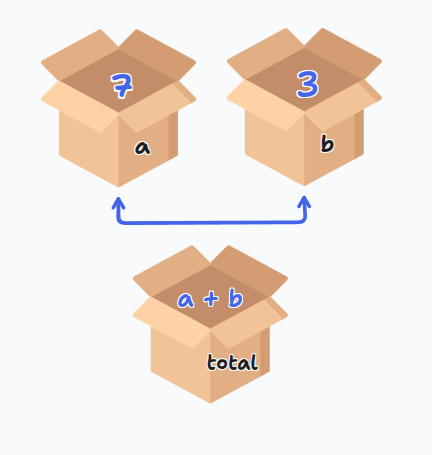
The = sign is for assignment, not mathematical equality. You're telling Python to store the right side value in the left side variable.
Multiple assignment:
x, y, z = 1, 2, 3
Variable Naming Rules
- Must start with letter or underscore
- Can contain letters, numbers, underscores
- Cannot start with number
- Cannot contain spaces
- Cannot use Python keywords (
for,if,class, etc.) - Case sensitive:
age,Age,AGEare different
Assignment Operators
x += 3 → Same as x = x + 3
x -= 2 → Same as x = x - 2
x *= 4 → Same as x = x * 4
x /= 2 → Same as x = x / 2
Reading Input
name = input("What's your name? ")
print(f"Hello, {name}!")
input() always returns a string! Even if the user types 42, you get "42".
Converting input:
age = int(input("How old are you? "))
price = float(input("Enter price: $"))
Practice
Ask for a number, print its square in a complete sentence ending with a period (use sep)
Compute: (512 - 282) / (47 × 48 + 5)
Convert kilograms to pounds (2.2 pounds per kilogram)
Basic Data Types
Strings
Text inside quotes:
name = "Mahmoud"
message = 'Hello'
Can use single or double quotes. Strings can contain letters, numbers, spaces, symbols.
Numbers
- int → Whole numbers:
7,0,-100 - float → Decimals:
3.14,0.5,-2.7
Boolean
True or false values:
print(5 > 3)        # True
print(2 == 10)      # False
print("a" in "cat") # True
Logical Operators
and → Both must be true
or → At least one must be true
not → Reverses the boolean
== → Equal to
!= → Not equal to
>, <, >=, <= → Comparisons
Practice
Read a DNA sequence and check:
1. Contains BOTH "A" AND "T"
2. Contains "U" OR "T"
3. Is pure RNA (no "T")
4. Is empty or only whitespace
5. Is valid DNA (only A, T, G, C)
6. Contains "A" OR "G" but NOT both
7. Contains any stop codon ("TAA", "TAG", "TGA")
Type Checking and Casting
print(type("hello"))  # <class 'str'>
print(type(10))       # <class 'int'>
print(type(3.5))      # <class 'float'>
print(type(True))     # <class 'bool'>
Type casting:
int("10")      # 10
float(5)       # 5.0
str(3.14)      # "3.14"
bool(0)        # False
bool(5)        # True
list("hi")     # ['h', 'i']
int("hello") and float("abc") will cause errors!
Sequences
Strings
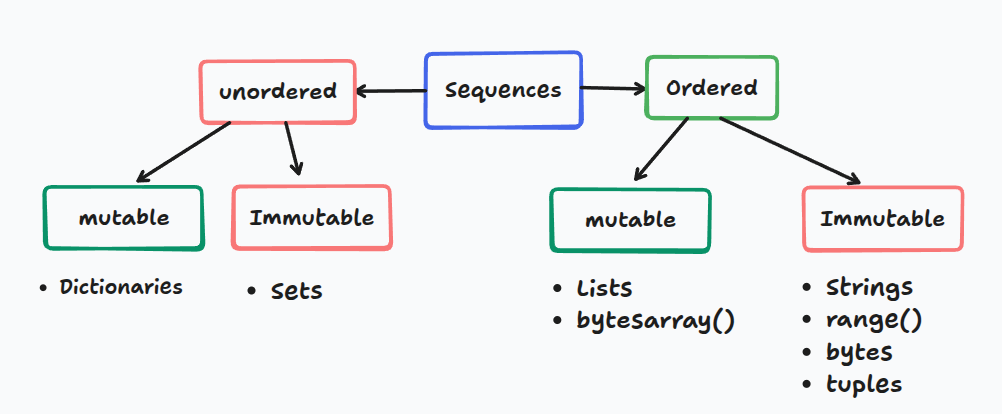
Strings are sequences of characters.
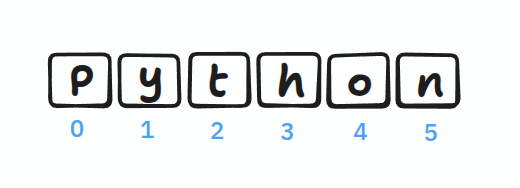
Indexing
Indexes start from 0:
name = "Python"
print(name[0])   # P
print(name[3])   # h
You cannot change characters directly: name[0] = "J" causes an error!
But you can reassign the whole string: name = "Java"
String Operations
# Concatenation
"Hello" + " " + "World"  # "Hello World"

# Multiplication
"ha" * 3                 # "hahaha"

# Length
len("Python")            # 6

# Methods
text = "hello"
text.upper()             # "HELLO"
text.replace("h", "j")   # "jello"
Common String Methods
.upper(), .lower(), .capitalize(), .title()
.strip(), .lstrip(), .rstrip()
.replace(old, new), .split(sep), .join(list)
.find(sub), .count(sub)
.startswith(), .endswith()
.isalpha(), .isdigit(), .isalnum()
Practice
Convert DNA → RNA only if T exists (don't use if)
Check if DNA starts with "ATG" AND ends with "TAA"
Read text and print the last character
Lists
Lists can contain different types and are mutable (changeable).
numbers = [1, 2, 3]
mixed = [1, "hello", True]
List Operations
# Accessing
colors = ["red", "blue", "green"]
print(colors[1])  # "blue"

# Modifying (lists ARE mutable!)
colors[1] = "yellow"

# Adding
colors.append("black")          # Add at end
colors.insert(1, "white")       # Add at position

# Removing
del colors[1]                   # Remove by index
value = colors.pop()            # Remove last
colors.remove("red")            # Remove by value

# Sorting
numbers = [3, 1, 2]
numbers.sort()                  # Permanent
sorted(numbers)                 # Temporary

# Other operations
numbers.reverse()               # Reverse in place
len(numbers)                    # Length
Practice
Print the middle element of a list
Mutate RNA: ["A", "U", "G", "C", "U", "A"]
- Change first "A" to "G"
- Change last "A" to "C"
Swap first and last codon in: ["A","U","G","C","G","A","U","U","G"]
Create complementary DNA: A↔T, G↔C for ["A","T","G","C"]
Slicing
Extract portions of sequences: [start:stop:step]

[0:3] gives indices 0, 1, 2 (NOT 3)
Basic Slicing
numbers = [0, 1, 2, 3, 4, 5, 6, 7, 8, 9]

numbers[2:5]      # [2, 3, 4]
numbers[:3]       # [0, 1, 2] - from beginning
numbers[5:]       # [5, 6, 7, 8, 9] - to end
numbers[:]        # Copy everything
numbers[::2]      # [0, 2, 4, 6, 8] - every 2nd element
Negative Indices
Count from the end: -1 is last, -2 is second-to-last
numbers[-1]       # 9 - last element
numbers[-3:]      # [7, 8, 9] - last 3 elements
numbers[:-2]      # [0, 1, 2, 3, 4, 5, 6, 7] - all except last 2
numbers[::-1]     # Reverse!
Practice
Reverse middle 6 elements (indices 2-7) of [0,1,2,3,4,5,6,7,8,9]
Get every 3rd element backwards from ['a','b',...,'j']
Swap first 3 and last 3 characters in "abcdefghij"
Control Flow
If Statements
age = 18

if age >= 18:
    print("Adult")
elif age >= 13:
    print("Teen")
else:
    print("Child")
elif stops checking after first match. Separate if statements check all conditions.
Practice
Convert cm to inches (2.54 cm/inch). Print "invalid" if negative.
Print student year: ≤23: freshman, 24-53: sophomore, 54-83: junior, ≥84: senior
Number guessing game (1-10)
Loops
For Loops
# Loop through list
for fruit in ["apple", "banana"]:
    print(fruit)

# With index
for i, fruit in enumerate(["apple", "banana"]):
    print(f"{i}: {fruit}")

# Range
for i in range(5):        # 0, 1, 2, 3, 4
    print(i)

for i in range(2, 5):     # 2, 3, 4
    print(i)

for i in range(0, 10, 2): # 0, 2, 4, 6, 8
    print(i)
While Loops
count = 0
while count < 5:
    print(count)
    count += 1
Make sure your condition eventually becomes False!
Control Statements
break → Exit loop immediately
continue → Skip to next iteration
pass → Do nothing (placeholder)
Practice
Print your name 100 times
Print numbers and their squares from 1-20
Print: 8, 11, 14, 17, ..., 89 using a for loop
String & List Exercises
1. Count spaces to estimate words
2. Check if parentheses are balanced
3. Check if word contains vowels
4. Encrypt by rearranging even/odd indices
5. Capitalize first letter of each word
1. Replace all values > 10 with 10
2. Remove duplicates from list
3. Find longest run of zeros
4. Create [1,1,0,1,0,0,1,0,0,0,...]
5. Remove first character from each string
F-Strings (String Formatting)
Modern, clean way to format strings:
name = 'Ahmed'
age = 45
txt = f"My name is {name}, I am {age}"
Number Formatting
pi = 3.14159265359

f'{pi:.2f}'              # '3.14' - 2 decimals
f'{10:03d}'              # '010' - pad with zeros
f'{12345678:,d}'         # '12,345,678' - commas
f'{42:>10d}'             # '        42' - right align
f'{1234.5:>10,.2f}'      # '  1,234.50' - combined
Functions in F-Strings
name = "alice"
f"Hello, {name.upper()}!"        # 'Hello, ALICE!'

numbers = [3, 1, 4]
f"Sum: {sum(numbers)}"           # 'Sum: 8'
String Methods
split() and join()
# Split
text = "one,two,three"
words = text.split(',')          # ['one', 'two', 'three']
text.split()                     # Split on any whitespace

# Join
words = ['one', 'two', 'three']
', '.join(words)                 # 'one, two, three'
''.join(['H','e','l','l','o'])   # 'Hello'
partition()
Splits at first occurrence:
email = "user@example.com"
username, _, domain = email.partition('@')
# username = 'user', domain = 'example.com'
Character Checks
'123'.isdigit()          # True - all digits
'Hello123'.isalnum()     # True - letters and numbers
'hello'.isalpha()        # True - only letters
'hello'.islower()        # True - all lowercase
'HELLO'.isupper()        # True - all uppercase
Two Sum Problem
Given an array of integers and a target, return indices of two numbers that add up to target.
# Input: nums = [2, 7, 11, 15], target = 9
# Output: [0, 1]  (because 2 + 7 = 9)
Brute Force Solution (O(n²))
nums = [2, 7, 11, 15]
target = 9

for i in range(len(nums)):
    for j in range(i + 1, len(nums)):
        if nums[i] + nums[j] == target:
            print([i, j])
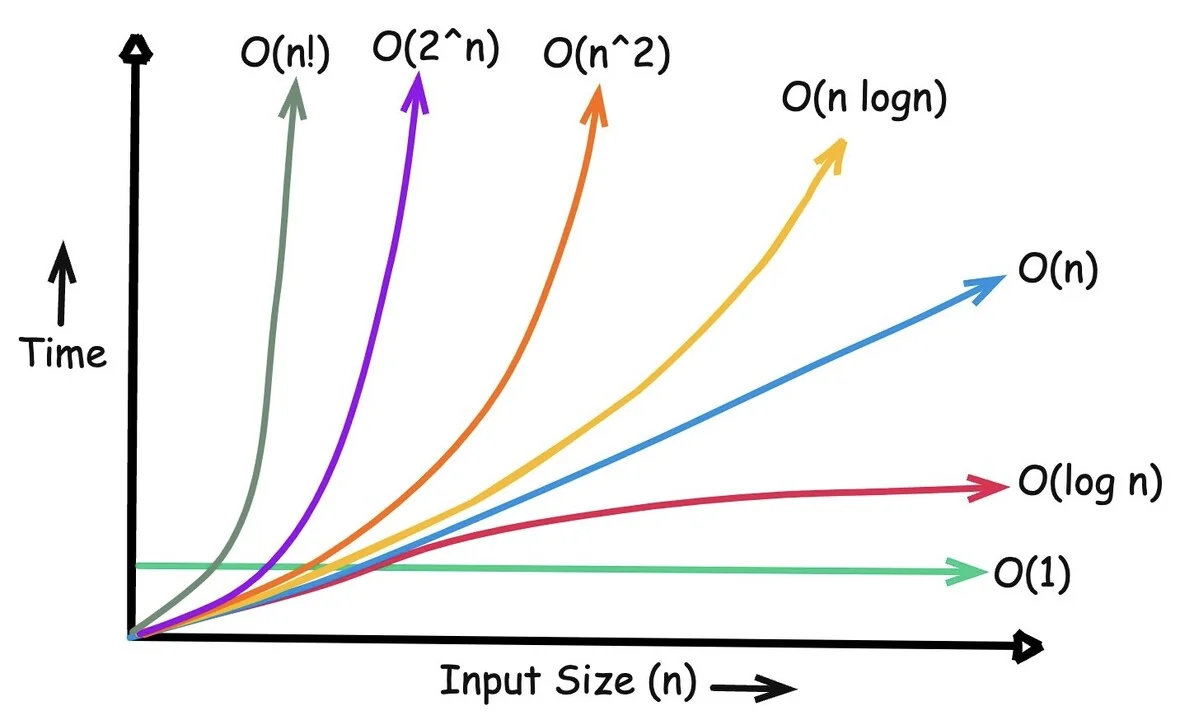
Time complexity: O(n²)
10 elements = ~100 operations
1,000 elements = ~1,000,000 operations!
Unpacking with * and **
Unpacking Iterables (*)
# Basic unpacking
numbers = [1, 2, 3]
a, b, c = numbers

# Catch remaining items
first, *middle, last = [1, 2, 3, 4, 5]
# first = 1, middle = [2, 3, 4], last = 5

# In function calls
def add(a, b, c):
    return a + b + c

numbers = [1, 2, 3]
add(*numbers)  # Same as add(1, 2, 3)

# Combining lists
list1 = [1, 2]
list2 = [3, 4]
combined = [*list1, *list2]  # [1, 2, 3, 4]
Unpacking Dictionaries (**)
# Merge dictionaries
defaults = {'color': 'blue', 'size': 'M'}
custom = {'size': 'L'}
final = {**defaults, **custom}
# {'color': 'blue', 'size': 'L'}

# In function calls
def create_user(name, age, city):
    print(f"{name}, {age}, {city}")

data = {'name': 'Bob', 'age': 30, 'city': 'NYC'}
create_user(**data)
* unpacks iterables into positional arguments
** unpacks dictionaries into keyword arguments